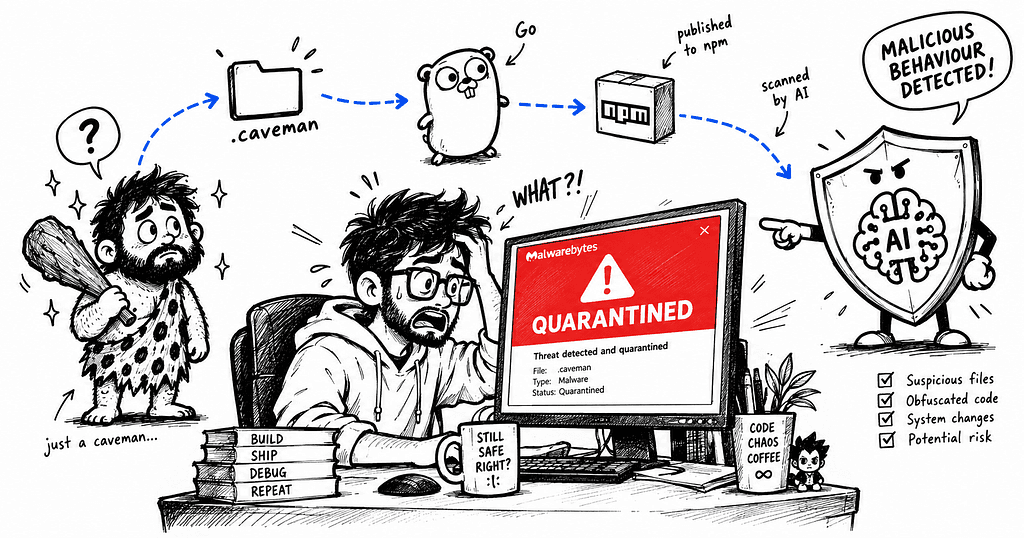
“3 months of using the same tool. Zero issues. And then one morning, a Malwarebytes popup that genuinely made my stomach drop.”

It was a completely normal Monday morning.
I had Claude Code open. I was in the middle of working on my portfolio rebuild — Jaspr, Serverpod, the usual chaos of a monorepo you’re rebuilding from scratch. Coffee was getting cold. I was doing that thing where you’re half-focused on code and half-focused on nothing.
And then Malwarebytes popped up.
Threats Detected: 1
Threats Quarantined: 1
Malware.AI.1244165698
C:\USERS\<username>\.CAVEMAN\BIN\CAVEMAN-BROWSE.EXE
I stared at the screen for a second.
.CAVEMAN\BIN\CAVEMAN-BROWSE.EXE
My brain was doing the thing brains do when something familiar becomes suddenly unfamiliar. I knew that path. I’d set it up myself, three months ago. I’d been using it almost every single day since.
But seeing it labeled Malware — quarantined, flagged, highlighted in red — made me feel like I’d been living with something I shouldn’t have.
Let me break down exactly what happened, what Caveman actually is, and why Malwarebytes flagged it. Because the answer is more interesting than a simple yes or no.
🪨 First: What Even Is Caveman?
If you haven’t come across it — Caveman is a token compression layer for AI coding agents.
“Why use many token when few token do trick.” That’s literally the tagline. And it earns it.
When you’re running Claude Code or Gemini CLI in long sessions, your context window fills up fast. Verbose outputs, long tool results, repeated file reads — it all adds up. Caveman compresses that output aggressively. Same technical accuracy. Fewer tokens. Faster, cheaper sessions.
I added it three months ago when I noticed my Claude Code sessions were ballooning in cost for no good reason. Install is one command:
npx skills add JuliusBrussee/caveman
It works across Claude Code, Gemini CLI, Cursor, Copilot, Codex, Windsurf, Cline — basically any agent that supports the skills framework. 26,000+ stars on GitHub. Actively maintained. Used by developers running the same AI-heavy workflows I run.
🌐 The Specific Component That Got Flagged: Caveman Browse
Now here’s where the specific file matters.
caveman-browse.exe is a separate component within the Caveman ecosystem. It's not the compression layer itself — it's the browser automation tool.
In plain terms: it lets your AI agent browse the web. Navigate to a URL, read the page structure, take actions — click, fill, scroll — all via MCP tools that Claude Code can call. Under the hood it’s a Go binary that attaches to the Chrome instance you’re already running, reads Chrome’s real accessibility tree, compresses it down to a fraction of what Playwright MCP would send, and hands it back to the agent.
The efficiency is genuinely impressive. Finding one row in a 200-row table costs roughly 150k total input tokens through caveman-browse, compared to 203k through Playwright MCP and 223k through Chrome DevTools MCP. For token-heavy developer workflows that matters.
The binary installs at ~/.caveman/bin/caveman-browse.exe on Windows. Which is exactly the path Malwarebytes found.
C:\USERS\<username>\.CAVEMAN\BIN\CAVEMAN-BROWSE.EXE
That’s my machine. A tool I installed and have been using daily for three months. And Malwarebytes’ AI just decided, on this particular scheduled scan, that it looked suspicious.
🔬 Breaking Down the Scan Report Line by Line
Let me walk through the actual log, because every field tells part of the story.
Scan Date: 9/22/2026
Scan Time: 11:24 AM
Scan Initiated By: Scheduler
This wasn’t me running a manual scan. This was a background scheduled scan. The popup just appeared out of nowhere while I was mid-session.
Objects Scanned: 279,219
Threats Detected: 1
Threats Quarantined: 1
279,219 objects scanned. One threat. That ratio matters — a system that active, that many files, and the only flag is a tool I consciously installed three months ago.
Rootkits: Disabled
Rootkit scanning was off. Important because rootkit detection is what catches something actively burrowing into your OS. This was a standard file scan — not a deep forensic sweep.
Malware.AI.1244165698
C:\USERS\<username>\.CAVEMAN\BIN\CAVEMAN-BROWSE.EXE
Quarantined, 1000000, 0, 1.0.114876
The 1000000 is Malwarebytes' internal confidence score format. The 0 that follows is the threat category identifier — in this case mapping to a generic AI detection bucket, not any named malware family. No specific threat name. No CVE. Just the AI saying it looks suspicious.
The hashes at the end:
C16B8D3F662B049B51C9FC84B53D65F8
AD5474CD7542FD3A83D247FD59B0ACFD8F4601284869F261EC0337628D76FDA9
MD5 and SHA-256. These are the exact fingerprints of the file. If you wanted to submit a false positive report to Malwarebytes, these are what you’d use.
🤖 What “Malware.AI” Actually Means — And Why It Gets Things Wrong
This is the part most people don’t know. And it’s the key to understanding why this happened.
Malware.AI is not a signature-based detection. It's not looking up a known fingerprint in a database of confirmed threats.
It’s Malwarebytes’ machine learning model assigning a risk score to a binary based on its characteristics. The model was trained on millions of malware and legitimate binary samples. When it sees something new, it produces a similarity score: how much does this pattern-match against things we’ve historically seen be malicious? If that score crosses a threshold, it flags.
The problem is that caveman-browse.exe ticks several boxes that the model has learned to associate with suspicious software — even though in this case those same characteristics are completely explained by what the tool legitimately is.
It’s a statically compiled Go binary.
Go compiles everything into a single self-contained executable. No external DLL dependencies, no system library calls in the way Windows programs usually make them. This is actually great engineering — the binary just works anywhere. But it also makes the PE structure look unusual compared to what most Windows software looks like. Malware authors sometimes use Go for exactly this reason. The model has learned that pattern. It fires on legitimate Go software too.
It installs into a hidden dot-folder.
~/.caveman/ follows Unix conventions. Developer CLI tools do this all the time on Mac and Linux. On Windows it's rarer. Hiding executables in dot-folders in the user home directory is a pattern malware uses to stay out of sight. The location alone adds risk weight in the model.
It was downloaded as a prebuilt binary via an npm shim.
Caveman’s install flow uses npm to run a setup script that downloads a precompiled binary for your platform. That’s a completely legitimate pattern. But “npm package that downloads and runs an exe” is also how some malware distribution campaigns work. The model can’t distinguish intent from mechanism — it sees the delivery pattern and assigns risk.
It’s new enough to have limited reputation data.
Malwarebytes’ detection models factor in how widely a binary is seen across their user base. The broader the install base, the more confident they can be that something is legitimate. Caveman Browse is relatively new software. Even with thousands of developers using it, the Windows installation count in Malwarebytes’ telemetry is small enough that the model defaults to uncertainty — and uncertainty tips toward flagging.
None of this means the binary is malware. It means it pattern-matches against characteristics that malware sometimes has. That’s a meaningful distinction.
✅ Is caveman-browse.exe Actually Malware? Direct Answer.
No.
Here’s how I’m confident:
The path matches exactly. The flagged file was sitting at C:\USERS\<username>\.CAVEMAN\BIN\CAVEMAN-BROWSE.EXE — precisely where Caveman installs its browser binary on Windows. This isn't a rogue process hiding behind a familiar name in a weird location. It's the actual tool in its documented install path.
The project is fully open source and widely used. The source code for caveman-browse is public on GitHub. You can read exactly what it does. It attaches to Chrome’s accessibility API and exposes MCP browser tools. That’s it. 26,000+ stars, actively maintained, used with Claude Code, Gemini CLI, and 20+ other platforms.
The binary is signature-verified at install time. The npm shim verifies the binary against a known checksum before writing it to disk. If the binary had been tampered with, the install would fail.
Only one engine flagged it. VirusTotal lets you check a file against 70+ antivirus engines simultaneously. A single Malware.AI detection with no corroborating flags from other engines is the textbook definition of a false positive candidate. Real malware gets caught by multiple engines.
Three months, no anomalous behaviour. No unusual network traffic, no processes running when the agent is inactive, no credential anomalies, nothing in the Windows event logs that looks out of place. Just browser automation doing exactly what it advertises.
🛡️ What To Do If This Happens To You
If you see a Malware.AI detection on a file you recognize — here's the process.
Don’t panic. But don’t blindly restore either.
Check the path first. A file under a tool you installed in a location that makes sense for that tool is very different from a file showing up in %TEMP%, AppData\Roaming, a Startup folder, or a path you don't recognize at all. The path tells most of the story.
Verify the origin.
Do you know where this file came from? Can you trace it to a GitHub repo, an npm package, or an installer you ran? If yes — check that those sources are what they claim to be.
Cross-check on VirusTotal.
Upload the quarantined file at virustotal.com — Malwarebytes keeps a copy in quarantine even after flagging. See what 70+ engines say. If only one engine flags it and it’s an AI-based generic detection, false positive likelihood is very high.
Restore with a path exclusion.
In Malwarebytes, go to Quarantine, restore the file, and add the specific file path to your exclusions list. This tells future scans to skip it without disabling protection on everything else.
Submit a false positive report.
Malwarebytes has a false positive submission form. Those two hashes from your log — MD5 and SHA-256 — are exactly what they need. Submitting helps their model improve and stops other developers from getting the same scare.
🧭 The Thought I Kept Coming Back To
I wrote a post recently about how Anthropic built a model that found hundreds of zero-day vulnerabilities in Firefox — bugs that survived decades of human review and automated fuzzing. AI doing something genuinely impressive that human reviewers couldn’t.
And then my antivirus AI flagged a legitimate developer tool as malware because it’s a Go binary sitting in a dot-folder.
Both things are true at the same time. AI security tools are genuinely powerful. And AI security tools make confident-looking mistakes on things they haven’t seen enough of.
The answer to “should I trust this detection?” isn’t “yes because the AI said so” and it isn’t “no because AIs get things wrong.” It’s the same as it’s always been: trace the origin, check the path, cross-reference multiple sources, use your judgment.
The popup scared me for about 45 seconds. Then I read the path, recognised the tool, traced the binary, and understood exactly what happened.
That’s the skill that actually matters here. Not panic. Not blind trust. Just knowing how to read what you’re looking at.
Caveman Browse is restored. The portfolio rebuild continues. 🪨
📋 Quick Reference: This Scan Report Decoded
Field Value What It Means Detection Name Malware.AI.1244165698 ML-based generic detection — not a known malware family File caveman-browse.exe Caveman’s browser automation Go binary Path C:\USERS<username>.CAVEMAN\BIN\ Exact documented install location for Caveman on Windows Action Quarantined File moved to Malwarebytes vault — not deleted, recoverable Rootkits Disabled No deep OS-level forensic scan was performed Verdict False positive Go binary in dot-folder triggered ML pattern match
Tags: Cybersecurity, Developer Tools, Malwarebytes, False Positive, Claude Code, Caveman, Windows Security, AI Security
Before you go
- Please take a moment to like the post and follow the writer!
- Did you know that over 400,000 developers share what they’re building, learning, and discovering across our platforms every month? Learn how you can contribute here.
Malwarebytes Flagged My AI Dev Tool as Malware. Here’s What Actually Happened. 🔐 was originally published in Stackademic on Medium, where people are continuing the conversation by highlighting and responding to this story.